
ChatGPT Search
In This Series


OpenAI’s ChatGPT took off in record-breaking fashion, becoming one of the fastest-growing applications built on a large language model (LLM) in history.
In just five days, ChatGPT surpassed 1 million users and within a few months, it was processing over a billion messages daily.
People aren’t just using ChatGPT as a search engine; they’re turning to it every day and often for tasks they used to take straight to Google. This shift means more reliance on artificial intelligence (AI)-powered answers and fewer clicks on traditional search engines.
So, where does the popularity of ChatGPT as a search engine leave your business? Does it drive more leads or pose greater risks to your digital marketing efforts?
It’s time to look beyond traditional search engine optimization (SEO). Find out how to optimize for ChatGPT and use it to boost AI visibility and gain influence in zero-click search.

ChatGPT Search is an AI-powered search tool that allows users to access real-time information directly within its interface.
Video Source: ChatGPT
ChatGPT synthesizes the most relevant content from Bing’s index and other trusted sources, then presents it in a conversational format. Instead of opening multiple tabs or scrolling through endless lists of search results, users receive concise, context-aware answers with clickable citations to explore further.
Decoding GPT
GPT stands for Generative Pre-Trained Transformer. GPTs are neural network models that use the transformer architecture to create human-like text and content, such as images, code and more.
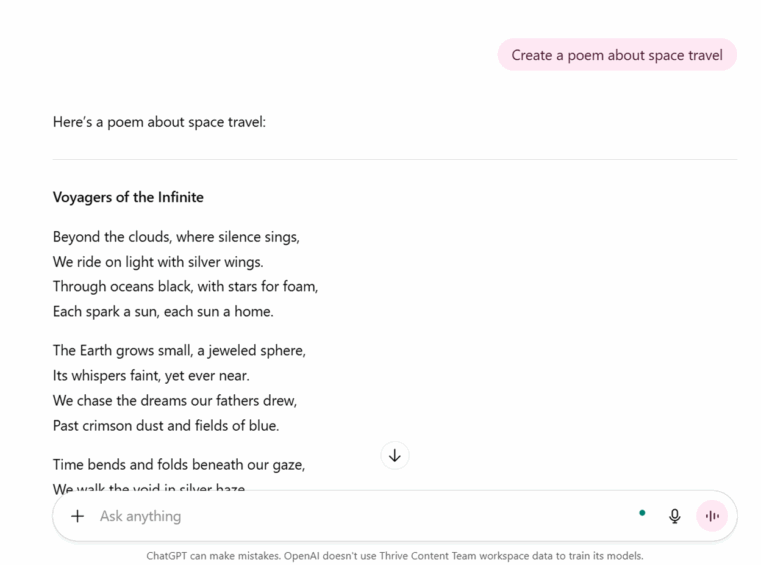
GENERATIVE: The model can create new content, such as sentences, code snippets, summaries or answers to questions, rather than simply copying existing materials.
For example, you can ask the ChatGPT search engine to “Create a poem about space travel,” and it will create an original piece of content rather than quoting NASA articles verbatim.
PRE-TRAINED: The model is pre-trained on vast amounts of datasets, including books, websites, articles and code repositories. This broad exposure gives it a general understanding of language and concepts before it’s fine-tuned for specific tasks.
Suppose you type into the ChatGPT search engine, “Summarize the main themes of Macbeth in under 150 words.”
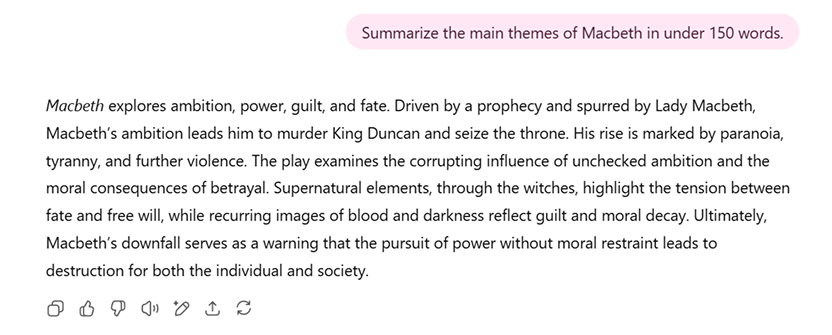
Because GPT was pre-trained on a massive amount of text, it can generate an accurate summary without having to look it up from scratch.
If real-time context is needed, ChatGPT Search can also use the Bing Search API to pull fresh information, then combine that with its pre-trained understanding to produce a clear, concise answer, often with cited sources.
For example:
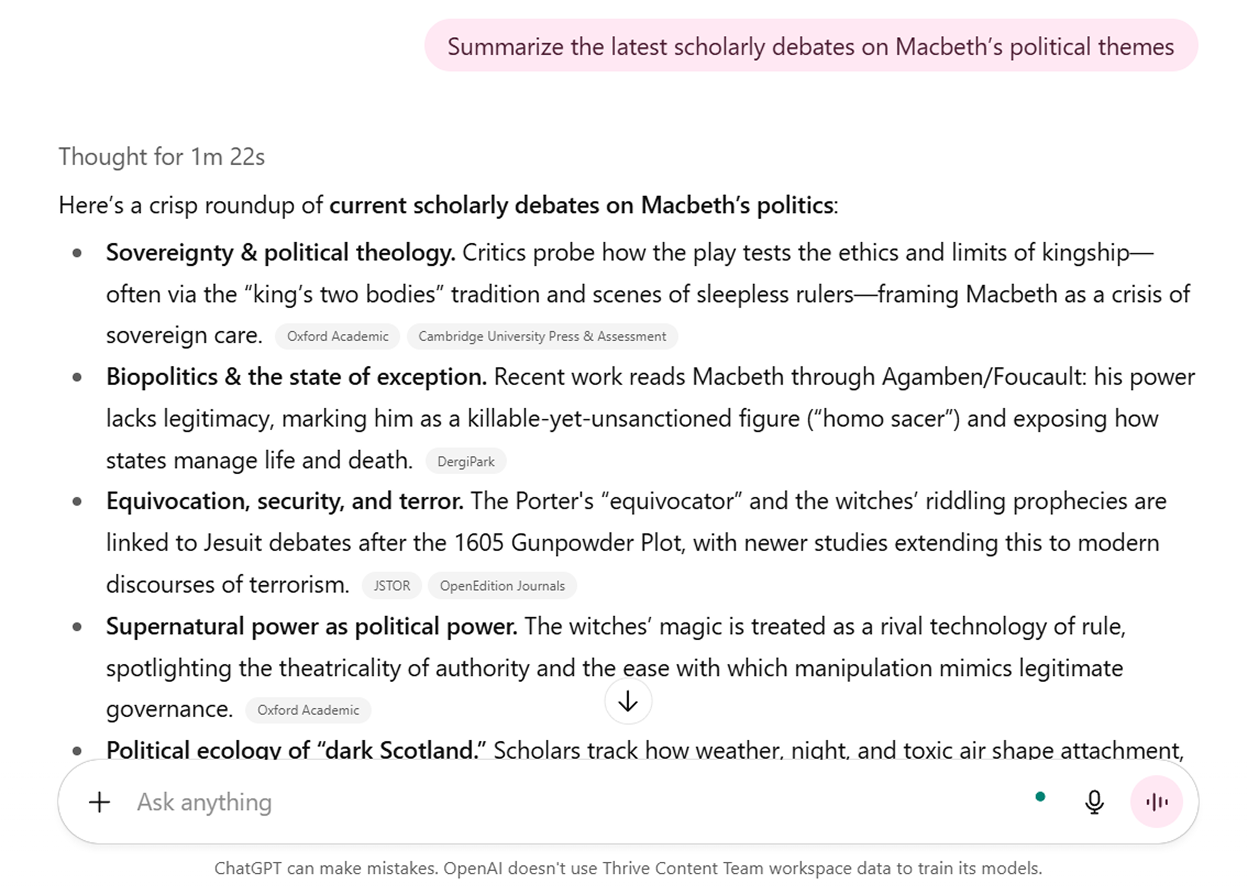
TRANSFORMER: This refers to the neural network architecture that allows ChatGPT to understand context and relationships between words and handle nuanced requests that older AI models often misinterpret.
For example, you can feed ChatGPT datasets and ask it to “Compare Q1 sales this year to the quarter where we launched the premium plan.”
A transformer-based model recognizes that “Q1 sales this year” refers to the first quarter of the current calendar year and that “the quarter where we launched the premium plan” points to a specific timeframe in the past, even if you don’t state the exact year or quarter number.
Older models or keyword-based search tools might treat this as two unrelated searches (“Q1 sales” and “premium plan launch”), forcing you to manually find and match the data.
Evolution of GPT Models
The development of GPT models represents one of the most significant progressions in AI history. Each iteration has brought exponential improvements in capabilities, parameters and practical applications.
| MODEL | RELEASE DATE | PARAMETERS | KEY FEATURES |
|---|---|---|---|
| GPT-1 | June 2018 | 117M |
|
| GPT-2 | February 2019 | 1.5B |
|
| GPT-3 | June 2020 | 175B |
|
| GPT-3.5 | November 2022 | 175B |
|
| GPT-4 | March 2023 | Undisclosed |
|
| GPT-5 | August 2025 | Undisclosed |
|
| GPT-5.1 | November 2025 | Undisclosed |
|
GPT-1 (June 2018)
OpenAI introduced the first GPT model, called GPT-1, in 2018. The model featured 117 million parameters and was among the most prominent language models at the time. GPT-1 was pre-trained on 7,000 unpublished books and could perform various tasks, including semantic similarity, textual alignment, reading comprehension and sentiment analysis.
What are parameters?
In the context of AI, parameters are the adjustable variables within a learning model that determine an AI’s behavior. For ChatGPT, parameters control how it interprets and responds to user input.
Some of the parameters that make ChatGPT a conversational powerhouse include temperature, max tokens and diversity penalty.
GPT-2 (February 2019)
GPT-2 featured 1.5 billion parameters and was trained with information from the Internet.
Unlike its predecessor, it could interpret inputs in natural language and generate output for tasks such as summarization, translation and question-answering without having seen explicit training examples for those tasks. This breakthrough demonstrated the potential of unsupervised LLMs for multitask learning.
GPT-3 (June 2020)
This represented a massive leap forward with 175 billion parameters and much more powerful capabilities than the previous models.
Due to ongoing concerns about disinformation and biases, OpenAI provided public access to GPT-3 through an API rather than releasing an open-source model. This allowed third parties to use the technology while OpenAI retained control over access.
GPT-3.5 (November 2022)
The model behind the original ChatGPT, GPT-3.5, is a fine-tuned version of GPT-3 that can understand and generate both natural language and code outputs.
GPT-4 (March 2023)
Released to ChatGPT Plus paid subscribers, GPT-4 significantly improved the LLM’s capabilities, especially for complex tasks.
Key improvements with this model include:
- Expanded context window from around 3,000 words to approximately 25,000 words
- More accurate answers with fewer errors or hallucinations
- Stronger safeguards, reducing responses to sensitive or restricted prompts
- Can analyze images and generate descriptive text outputs
What is a context window?
A context window, also called context length, is the amount of text (including words and symbols) measured in “tokens” that ChatGPT can process at once. This includes the input prompt and generated output.
A larger context window allows the LLM to process longer inputs and integrate more information into its responses.
GPT-5 (August 2025)
GPT-5 is designed to deliver smarter and faster performance, including powering Bing AI search. It features structured reasoning, multimodal understanding and extended memory, making it more capable across both everyday and complex tasks.
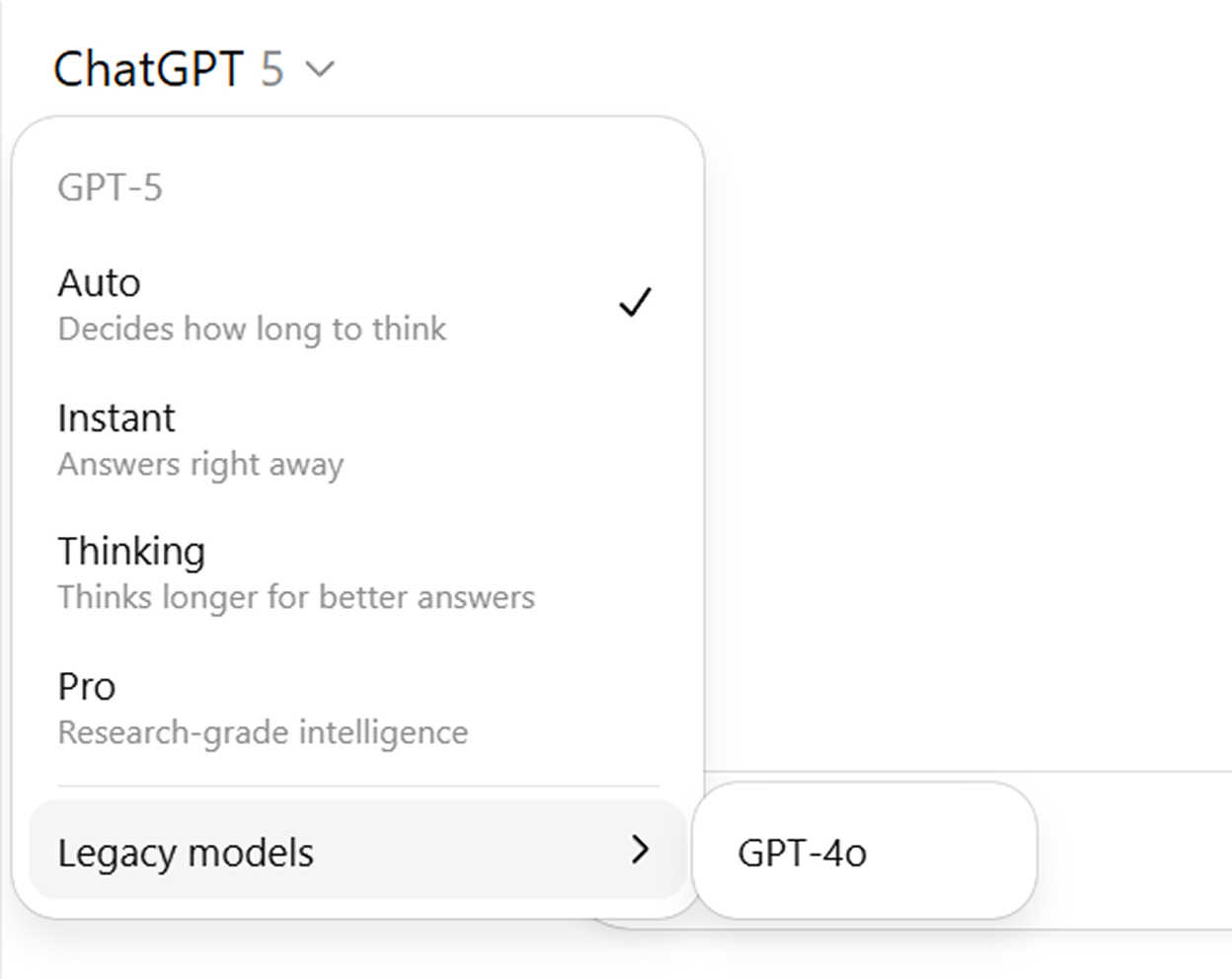
The model includes variants, such as Mini, Nano and Chat, as well as enhanced integration features such as calendar and email connectors. It also introduces personality modes (Auto, Instant, Thinking and Pro) for deeper reasoning.
GPT-5.1 (November 2025)
As of writing, GPT-5.1 is OpenAI’s most advanced GPT model. It delivers stronger reasoning, faster performance and improved multimodal processing, allowing it to handle text, images, documents and longer workflows with higher accuracy.
GPT5.1 also supports agentic actions, expanded context windows and new personality modes that adapt to different task needs.
How To Access ChatGPT Search
ChatGPT Search is now available to everyone, even those without an OpenAI account. This makes it one of the most accessible ways to get real-time answers to your queries.
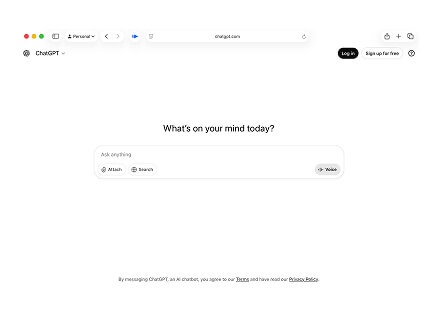
How To Access ChatGPT on a Desktop
1
Open your preferred web browser (Chrome, Firefox, Safari, or Edge).
2
Navigate to chat.openai.com.
3
Create an account or log in with your existing credentials.
4
Start chatting immediately with the free tier or upgrade to ChatGPT Plus for enhanced features.
How To Access ChatGPT on Mobile
1
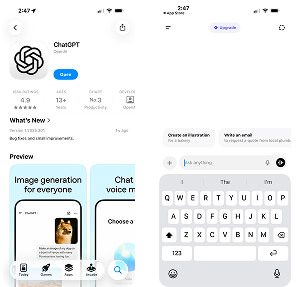
Download the official ChatGPT app on Apple or Google Play Store.
2
Sign in with your OpenAI account (or create one).
3
Start chatting just like on a desktop.


ChatGPT Search operates through a multi-layered system that combines several data sources and technologies to generate contextually aware and appropriate responses.
The ChatGPT Search Process
1
Query Understanding
The system analyzes the user input to determine the intent and information needed by the user.
2
Source Selection
Based on the query analysis, the system determines which information sources are most likely to contain relevant, authoritative answers.
3
Information Retrieval
The system searches across its various indexes and data sources to find the most relevant content.
4
Content Processing
Retrieved information is processed through ChatGPT’s language model to understand context and relevance.
5
Response Generation
The system synthesizes information from multiple sources into a coherent, conversational response while maintaining source attribution.
6
Quality Control
The response undergoes final checks for accuracy and appropriate sourcing before being presented to the user.
Let’s walk through each step to better understand how to rank in ChatGPT.
When a user types a query into ChatGPT Search, the system doesn’t simply fetch a single answer. Instead, it goes through a multi-step process that combines AI reasoning and quality checks. Each step ensures the final response is accurate and context-aware.
1. Query Understanding
The system analyzes user input using natural language processing (NLP). It examines keywords, intent and context to determine the exact information needed. It also disambiguates vague terms (e.g., “apple” could mean the fruit or the tech company).
Suppose you type into the ChatGPT search engine, “Best laptop for video editing under $1,000.”
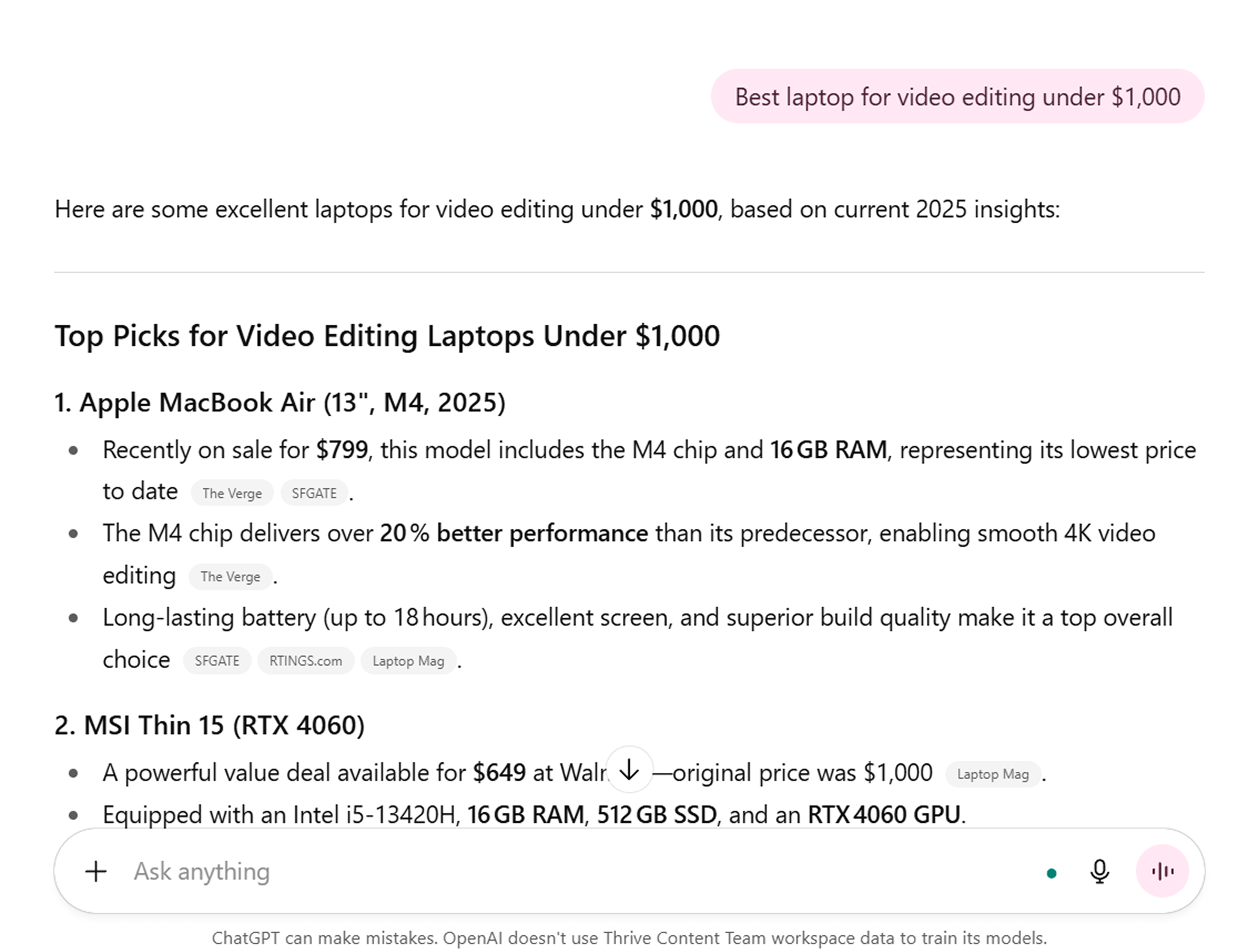
The LLM identifies the product category (laptop), detects the use case (video editing → needs strong graphic processing unit (GPU), good RAM (storage) and recognizes the budget constraint ($1,000).
By examining these variables, the system understands that the user isn’t asking for all laptops, but specifically those optimized for video editing within a price range.
What is natural language processing?
NLP is a subfield of artificial intelligence (AI) that enables LLMs to understand and interpret human language and respond in a conversational tone that resonates with users.
Instead of just matching keywords, ChatGPT interprets the intent behind your input. For example, if you ask, “What’s the best phone for photography? ”, it understands that you’re looking for specific recommendations and uses NLP to condense large amounts of text into clear, concise answers.
2. Source Selection
Once intent is clear, ChatGPT determines which sources are most likely to contain relevant, trustworthy answers. It decides whether to pull from news sites, review blogs, eCommerce platforms, academic journals or official documentation.
Consider a Bing AI search for the “Latest updates on Tesla’s full self-driving in 2025.”
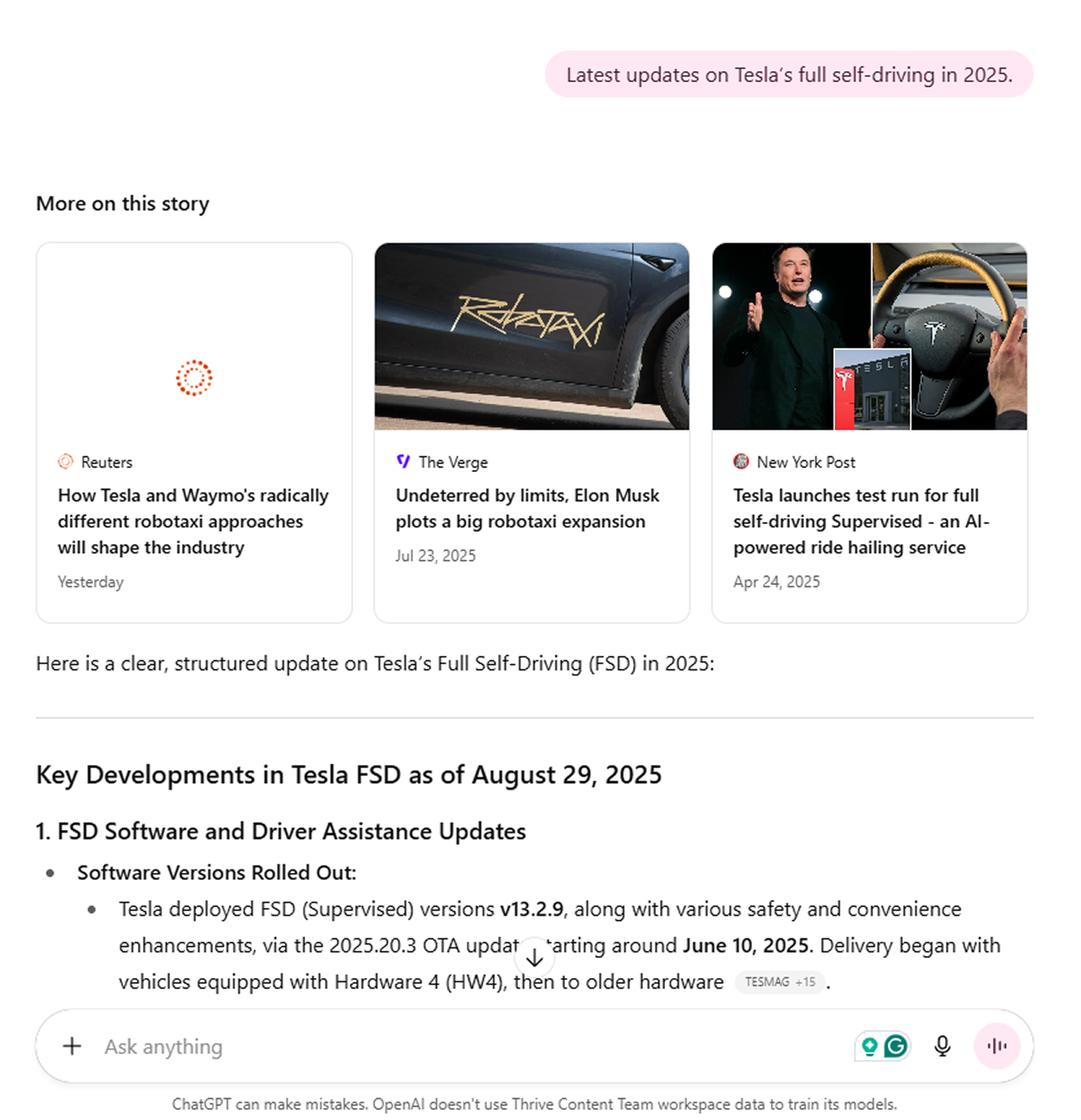
ChatGPT determines that the most reliable sources are credible news outlets such as Reuters or The New York Post, as well as Tesla’s own official blog or press releases.
It avoids pulling from irrelevant sites like car resale listings or personal forums. By doing so, the system ensures the information is authoritative and directly tied to the user’s query.
3. Information Retrieval
ChatGPT searches across its data sources to pull the most relevant information to answer the user’s query.
For example, when someone searches “What are the side effects of intermittent fasting? ”, the system retrieves results from trustworthy sources, which may include medical sites and academic research papers.
At the same time, it actively avoids low-quality or clickbait articles that may contain unverified claims. This allows the LLM to present balanced perspectives, such as noting both the potential benefits and the risks associated with intermittent fasting.
4. Content Processing
The retrieved data is then fed into the language model. ChatGPT evaluates the context, reliability and relevance of each piece of content. It verifies that multiple sources support the information, ensures it’s up-to-date and confirms it directly addresses the user’s question.
Consider the query, “Who won the 2024 Ballon d’Or?”
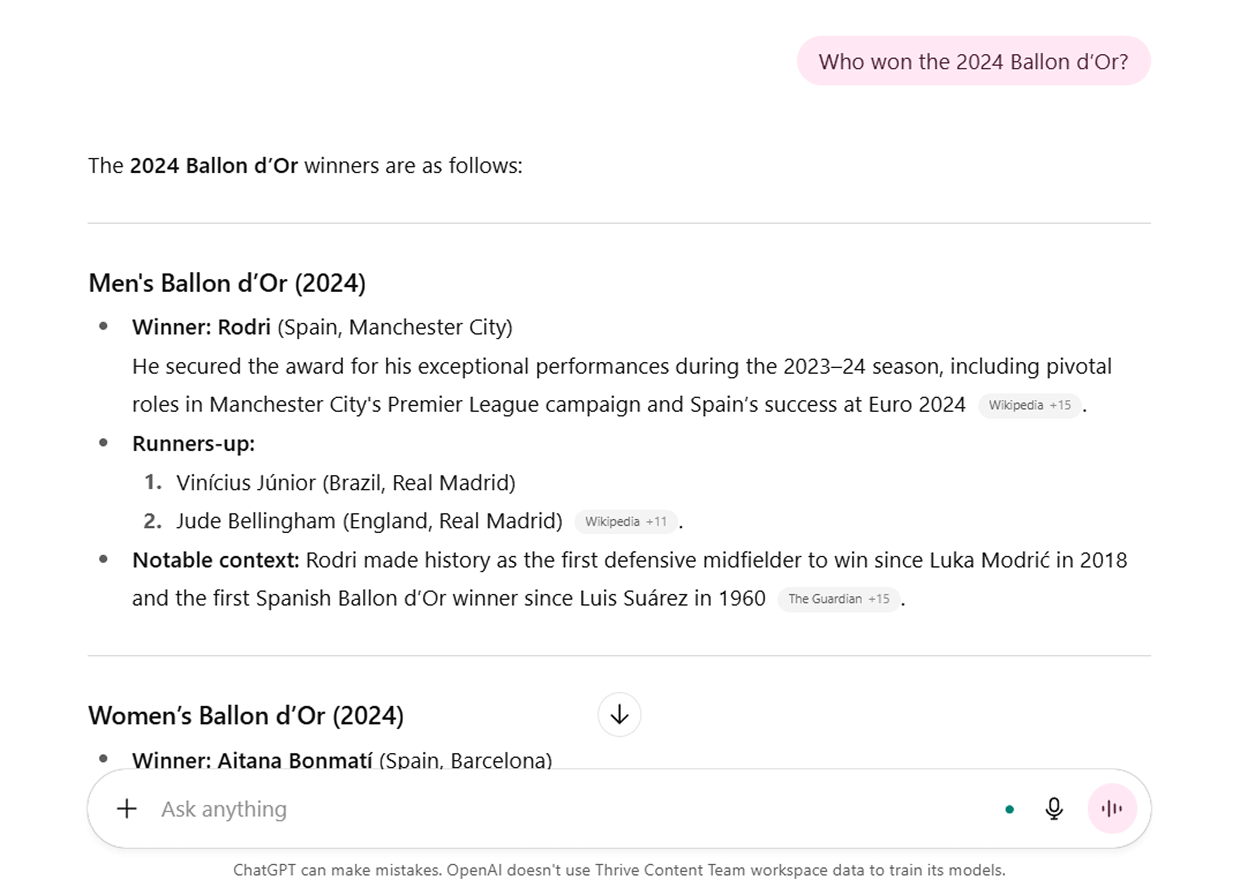
The system gathers data from multiple reputable sports news outlets and cross-checks the information. If several articles confirm that Manchester City’s Rodri won, the system accepts this as a verified fact.
Outdated or speculative articles published before the event would be filtered out. This step prevents ChatGPT from mistakenly presenting rumors or predictions as actual outcomes.
5. Response Generation
The system synthesizes information into a clear, conversational summary. It avoids jargon unless appropriate, includes multiple perspectives if needed and integrates citations with clickable links. The tone is designed to feel natural and human-like.
For example, you could ask ChatGPT to conduct a Bing AI search for the “Best places to visit in Kyoto during spring.”
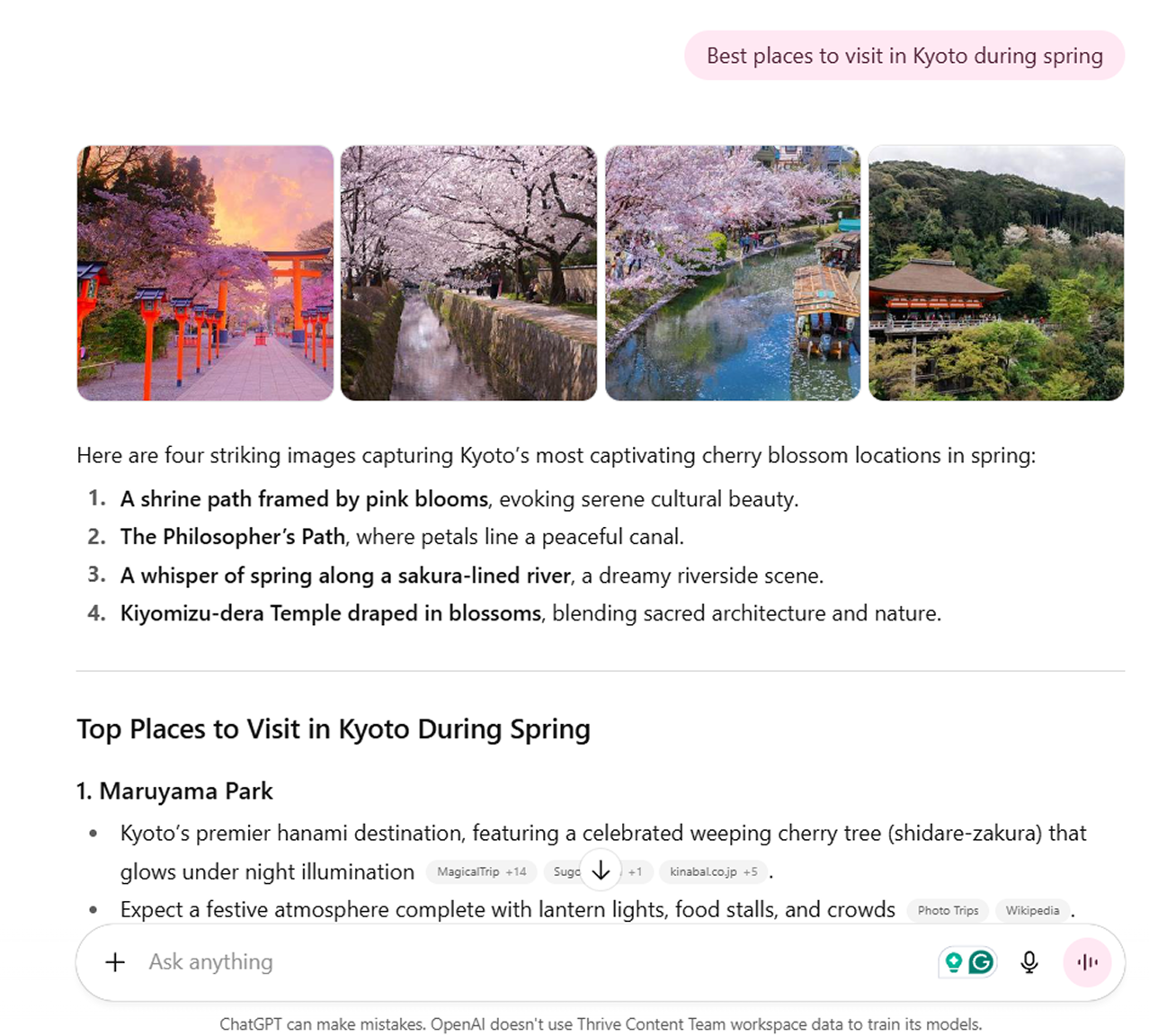
As seen above, the system synthesized information from travel blogs, tourism boards and guidebooks. Additionally, instead of just listing links, it provided bullet points of recommended places along with a quick summary at the end.
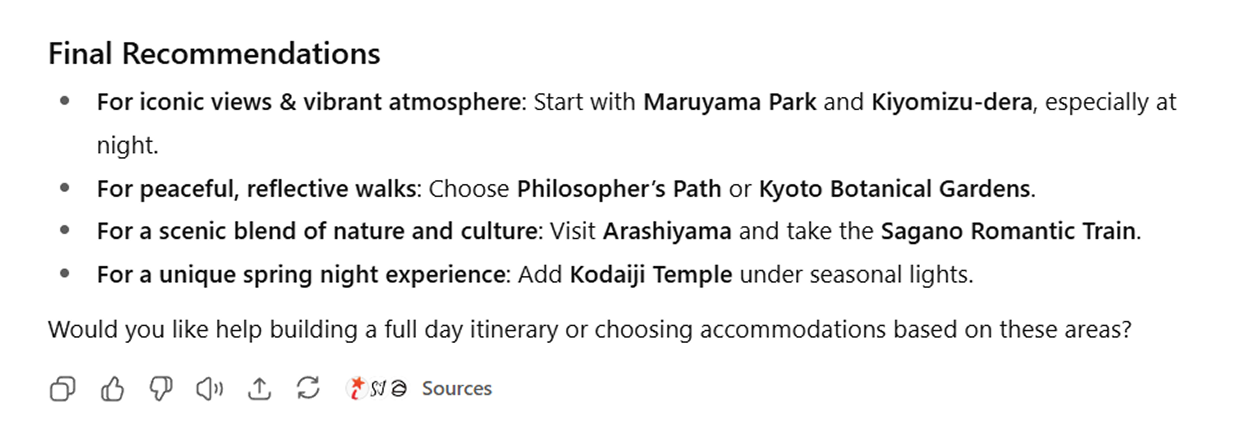
This makes the response feel natural and informative while keeping the references transparent.
6. Quality Control
Before the response reaches the user, the system runs final checks to:
- Ensure citations are valid.
- Remove duplicate or irrelevant details.
- Validate consistency (no conflicting statements).
- Filter out harmful content.
For a sensitive query like “How do I treat depression without medication? ”, the system gathers insights from reliable medical authorities, ensuring unsafe or unverified remedies are not included.
It also added a crucial disclaimer:

This final step ensures the output is accurate and aligned with safety guidelines.
ChatGPT Search Information Repositories
To deliver timely and context-aware responses, ChatGPT Search draws from multiple information repositories.
ChatGPT Search Data Sources
1. Web Search (Real-Time)
ChatGPT connects to the web in real time to deliver the most up-to-date information. Through its partnership with Microsoft, ChatGPT Search can access Bing’s massive search index. This provides the system with access to billions of web pages that have been crawled and indexed by Bingbot (a web crawler used by Microsoft).
2. Connected Knowledge Bases
ChatGPT can be integrated with external sources such as Google Drive, Slack, Notion or company databases. When enabled, it creates a temporary index of the connected content, allowing it to return context-relevant answers from private or organizational content.
3. Core Model Training Data
ChatGPT is trained on licensed data, publicly available information and human-created examples. This enables it to generate general knowledge responses even without external retrieval.


ChatGPT’s flexibility allows it to perform a wide range of tasks, from creating original content and writing code to extracting data from documents and generating images.
Let’s take a closer look at what ChatGPT search can do.
ChatGPT Search Features and Capabilities
1. Agentic AI
ChatGPT now boasts the ability to plan, make decisions and take actions on behalf of the user. Think of it as moving from a “chatbot” to a digital assistant that can get things done for you.
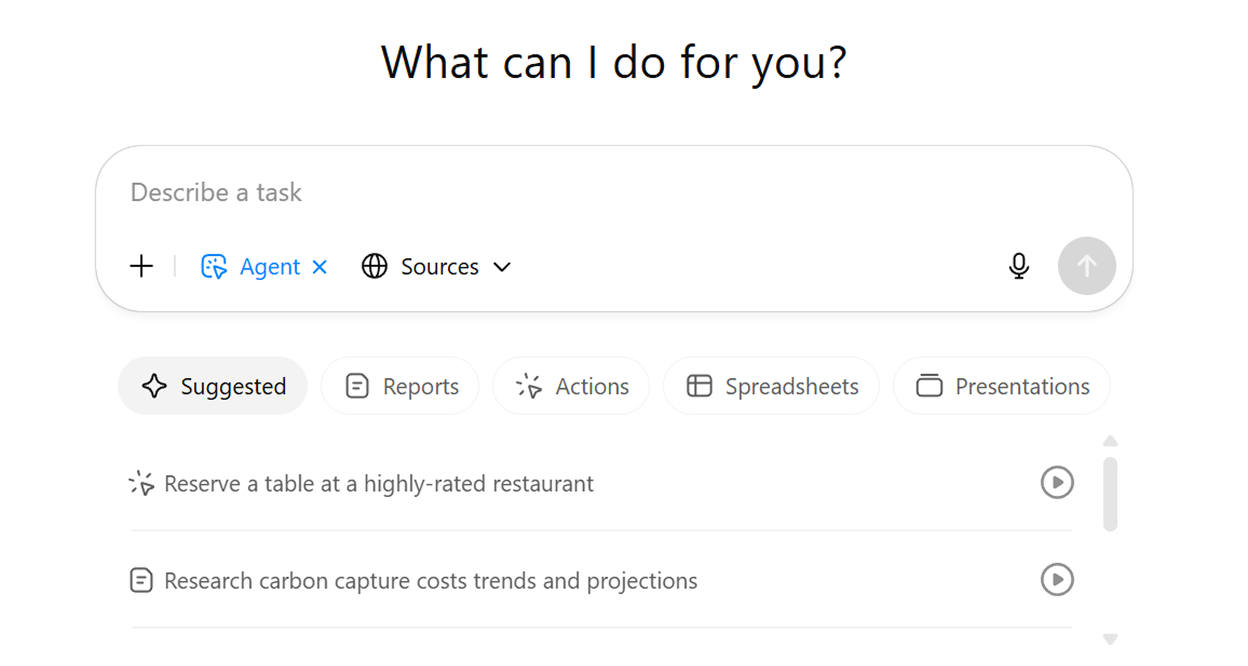
Instead of just responding to prompts with text, it:
- Can break goals into steps (e.g., find flights → compare → book).
- Integrates with tools and APIs (search, email, spreadsheets, calendar).
- Has memory, so it can remember preferences over time.
- Can automate tasks with your oversight, acting like a real assistant.
Let’s put it to the test:
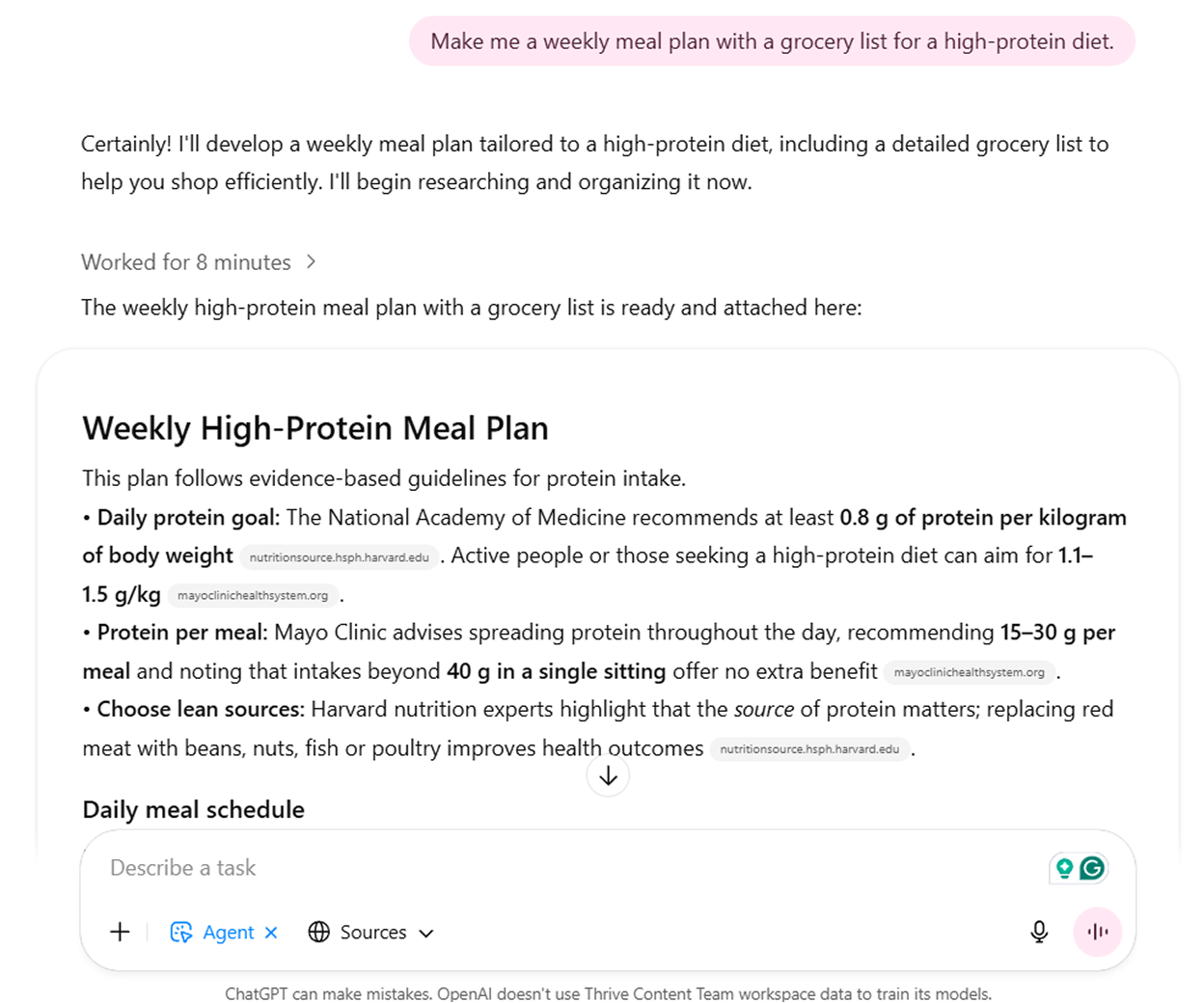
Based on a single prompt, ChatGPT generated a structured plan with breakfast, snack, lunch, dinner and nutritional breakdowns. Beyond meal planning, it can also suggest workout routines, travel itineraries or even curate personalized study schedules based on your goals.
2. Real-Time Information Retrieval
A major advancement in ChatGPT Search is its ability to retrieve up-to-date information. The model taps into Bing Search APIs to retrieve the latest news, prices, events and updates. This makes it possible to ask about today’s stock prices or breaking headlines and get accurate answers backed by live sources.
Key capabilities include:
- Breaking news and current events: Get instant updates on developing stories and global happenings.
- Live data feeds: Access real-time stock quotes, cryptocurrency prices and market fluctuations.
- Weather forecasts: Obtain current weather conditions and detailed forecasts for any location worldwide.
- Sports scores and schedules: Track live game results, upcoming matches and sports statistics.
3. Conversational Web Search
Instead of just scanning for keywords, ChatGPT interprets the meaning, intent and context of a query. This means you can ask questions conversationally, as if you’re speaking to another person, and still get relevant results.
Natural query processing:
- Ask questions as you would to a human:

- Follow-up questions that build on previous context:
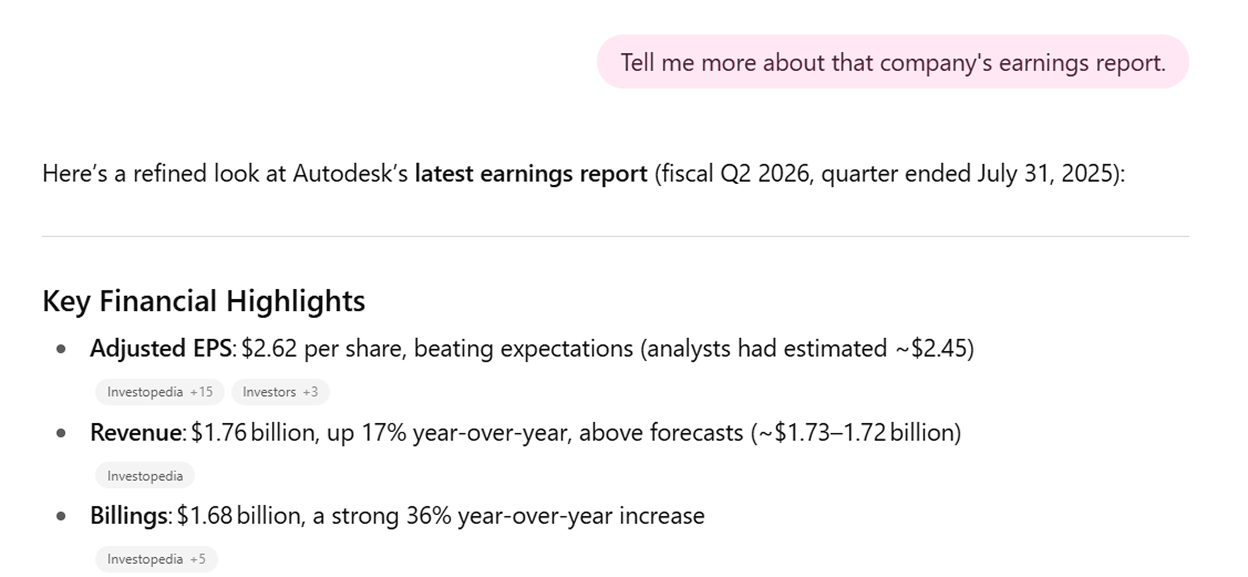
- Request clarifications:

This conversational flow makes research smoother and more intuitive.
4. Voice Mode
ChatGPT’s voice mode enables spoken conversations with the AI.
You can speak your input and hear ChatGPT respond aloud. This feature is available on the ChatGPT mobile app, desktop app and web, giving you flexibility across devices.
Check this out:
Some of the benefits of voice mode include:
- Hands-free convenience: Ideal while cooking, driving, walking or multitasking.
- Fluid, human-like conversations: Interrupt, ask follow-ups and shift topics naturally.
- Personalized interaction: Choose from expressive voices and adjust speed for comfort.
- Engaging and inclusive: Makes AI more approachable and useful for a wide range of people.
5. Trusted Source Integration
To improve reliability, ChatGPT can draw from authoritative sources and highlight them in responses.
For example, if you ask, “What are the health risks of high blood pressure?”
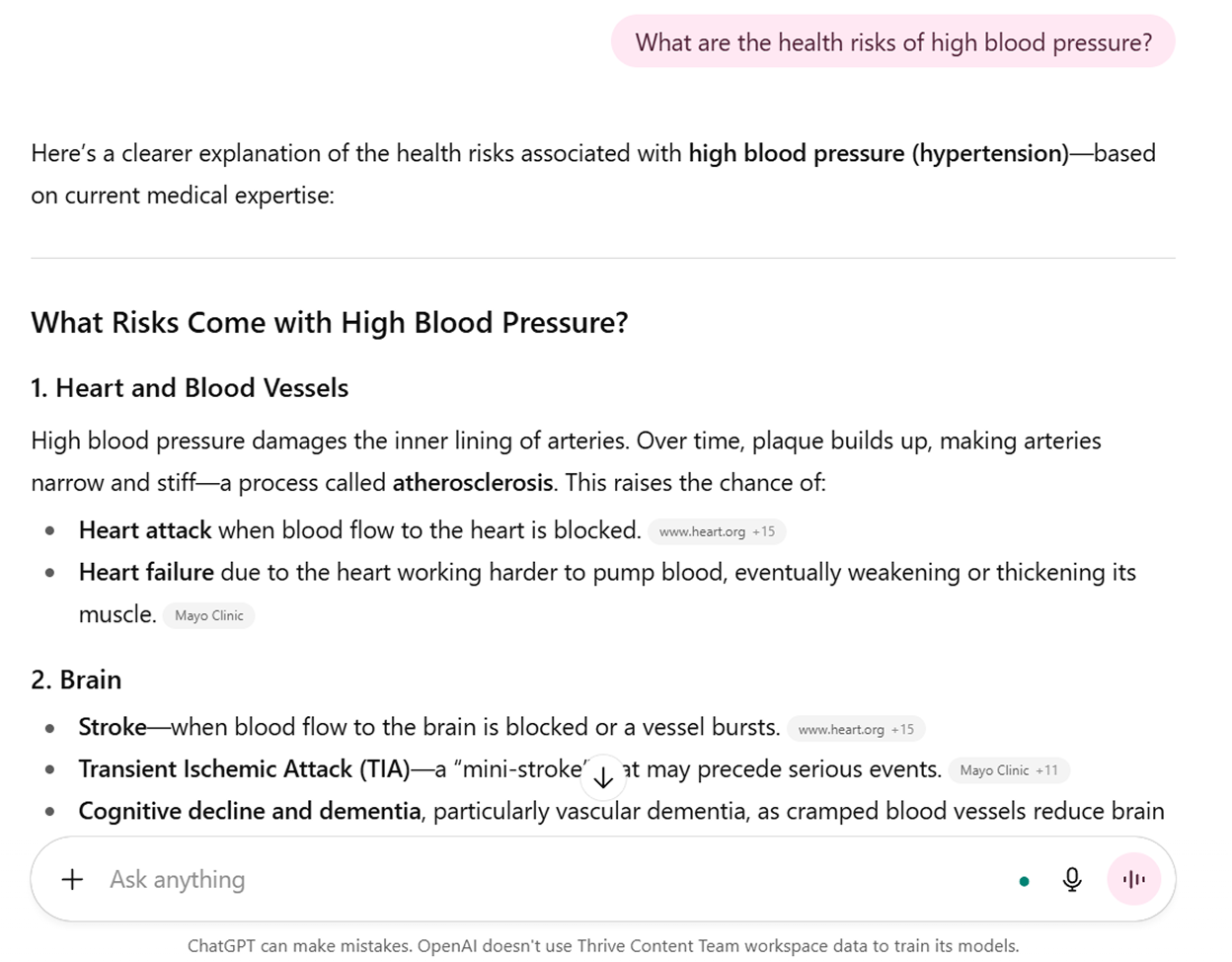
The answer is summarized with references from trusted medical institutions like the Mayo Clinic or the American Heart Association. This ensures users are getting credible and fact-checked knowledge.
6. Local Search and Mapping
ChatGPT Search isn’t limited to general knowledge or broad queries. It can also handle location-based searches.
Let’s try searching “Where is the nearest 24-hour pharmacy?”

ChatGPT can go beyond listing generic businesses. It can:
- Identify nearby options tailored to your location.
- Provide directions or map links so you can get there quickly.
- Offer business details, such as operating hours, phone numbers or customer reviews, when available.
This makes it easy to find relevant services without jumping between multiple apps.
7. Enhanced Research and Analysis
Perhaps one of ChatGPT Search’s biggest advantages is its ability to operate as an intelligent research assistant, guiding users through every stage of information discovery.
The LLM applies advanced natural language processing to handle tasks such as summarizing articles, drafting papers, outlining research, generating ideas and locating relevant sources. With the right prompts, ChatGPT can adapt its responses to your specific goals.
However, its outputs still require human review and validation to ensure accuracy and reliability.
ChatGPT’s Research Capabilities:
- Multi-source analysis: Compare information from various publications and sources.
- Topic exploration: Start with a broad query and drill down into specific aspects.
- Fact verification: Cross-reference claims across multiple reputable sources.
- Trend analysis: Identify patterns and developments across different periods.
8. Multimedia Content Discovery
ChatGPT Search goes beyond text-based answers. Built on the same OpenAI technology that powers Bing AI search, it can interpret queries and surface results in multiple formats, from videos to images.
For example, instead of just reading about the subject, you can ask it to “Show me a video that explains the process of photosynthesis.”
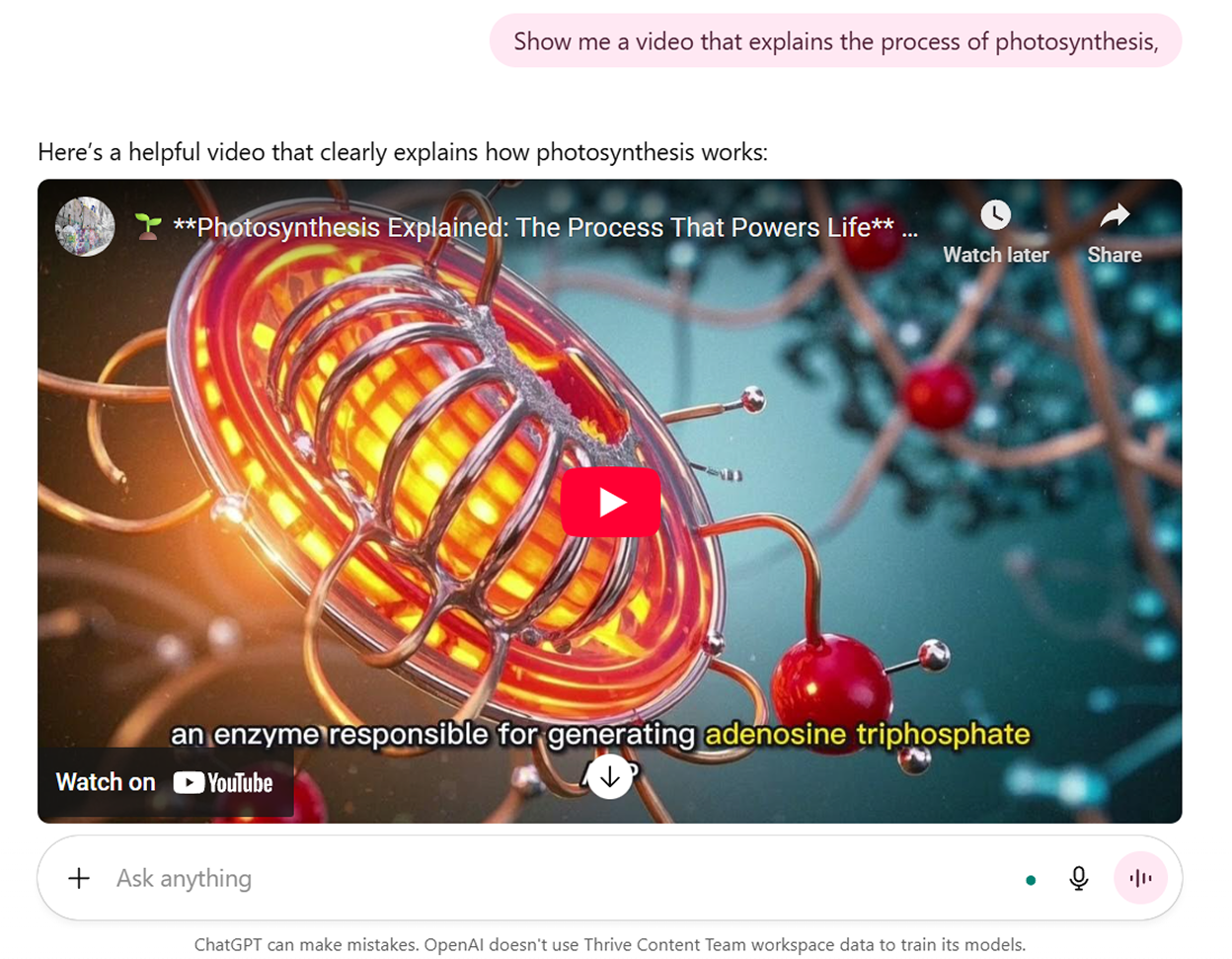
With this prompt, ChatGPT will locate an educational video, often summarizing key points while also providing a direct link to the source.
This dual approach ensures you get an immediate, conversational explanation and have the option to explore deeper through multimedia.
9. Content Creation
From long-form articles to short-form content, such as emails, ad copy and social media captions, ChatGPT adapts its tone, style and vocabulary to match the intended audience and purpose.
Let’s try asking it to “Write a social media caption promoting a beachwear summer sale.”
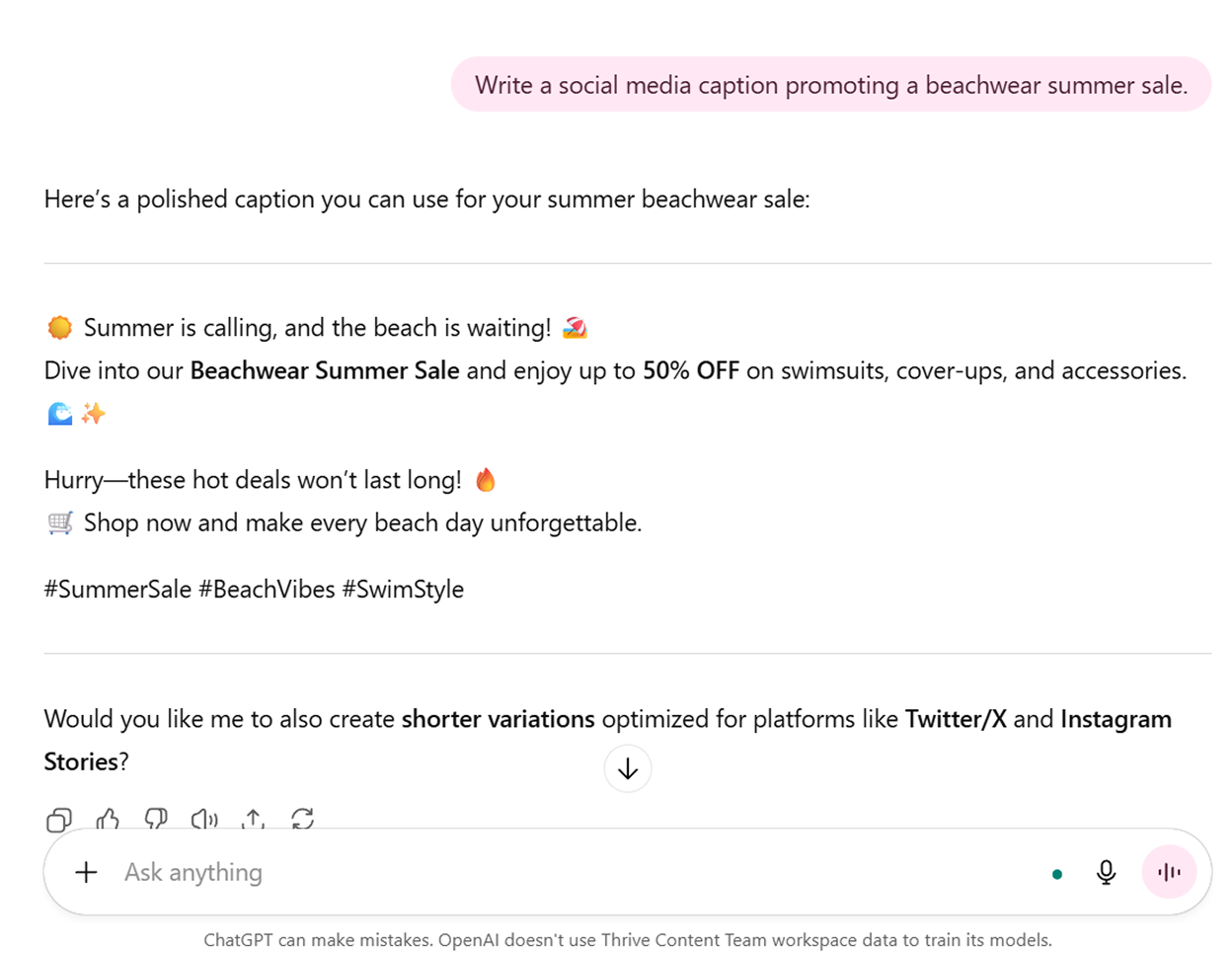
Within seconds, ChatGPT produces polished, on-brand text. Rather than replacing human creativity, it acts as a collaborative partner, streamlining repetitive tasks and sparking new ideas.
10. Data Extraction and Summarization
ChatGPT Search is particularly useful when working with large amounts of unstructured information.
Data Extraction: Instead of manually combing through data, ChatGPT can extract specific information, such as names, figures, dates or ratings, and arrange it into a simple table or list. This is particularly valuable when handling lengthy reports, spreadsheets, research papers or customer feedback datasets.
Summarization: ChatGPT can also condense documents into clear, concise overviews. You can simply upload content and receive a digestible summary that highlights the most important points.
Consider this example:
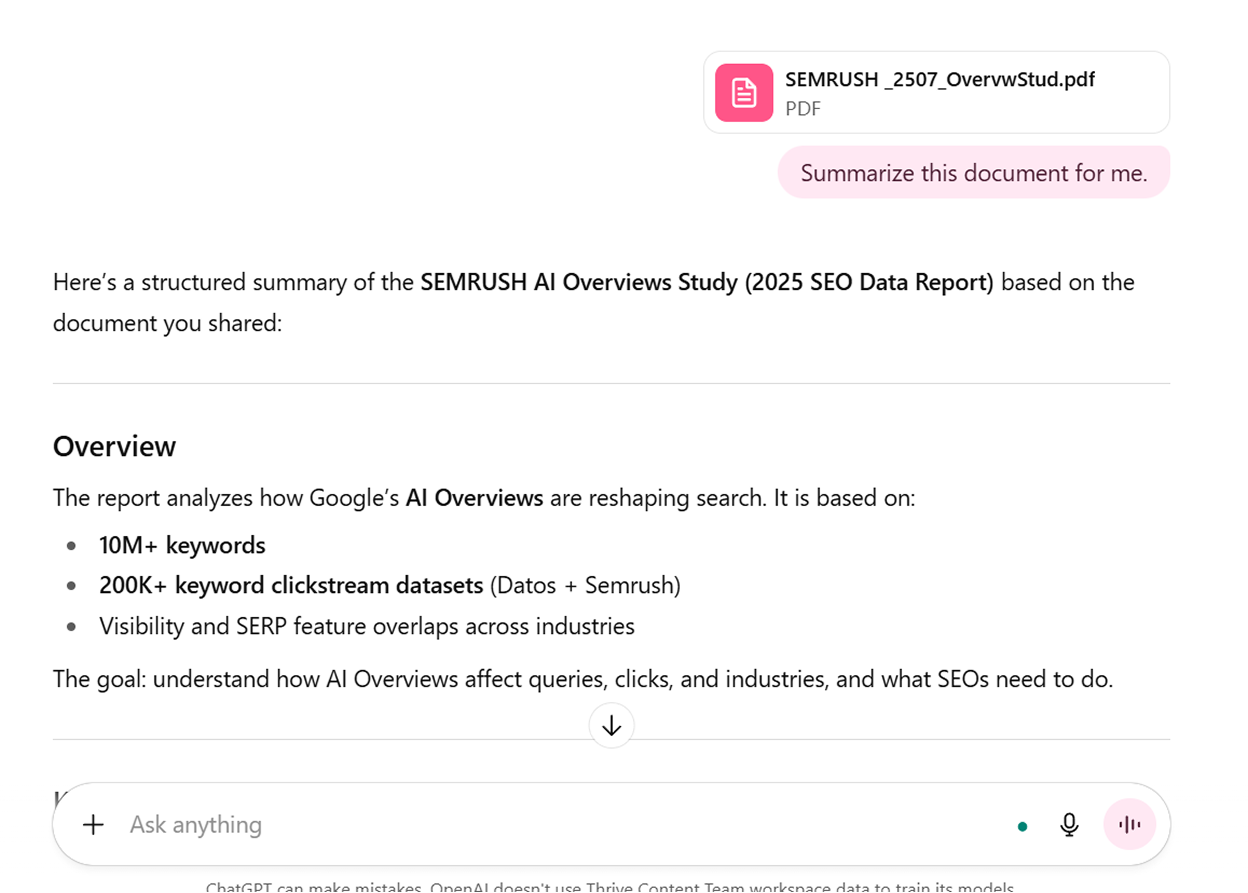
As seen above, we uploaded a PDF document about AI Overviews and asked ChatGPT to summarize the content. The LLM delivered a bullet-point breakdown, which reduced the effort needed to capture the document’s main findings.
11. Code Writing and Debugging
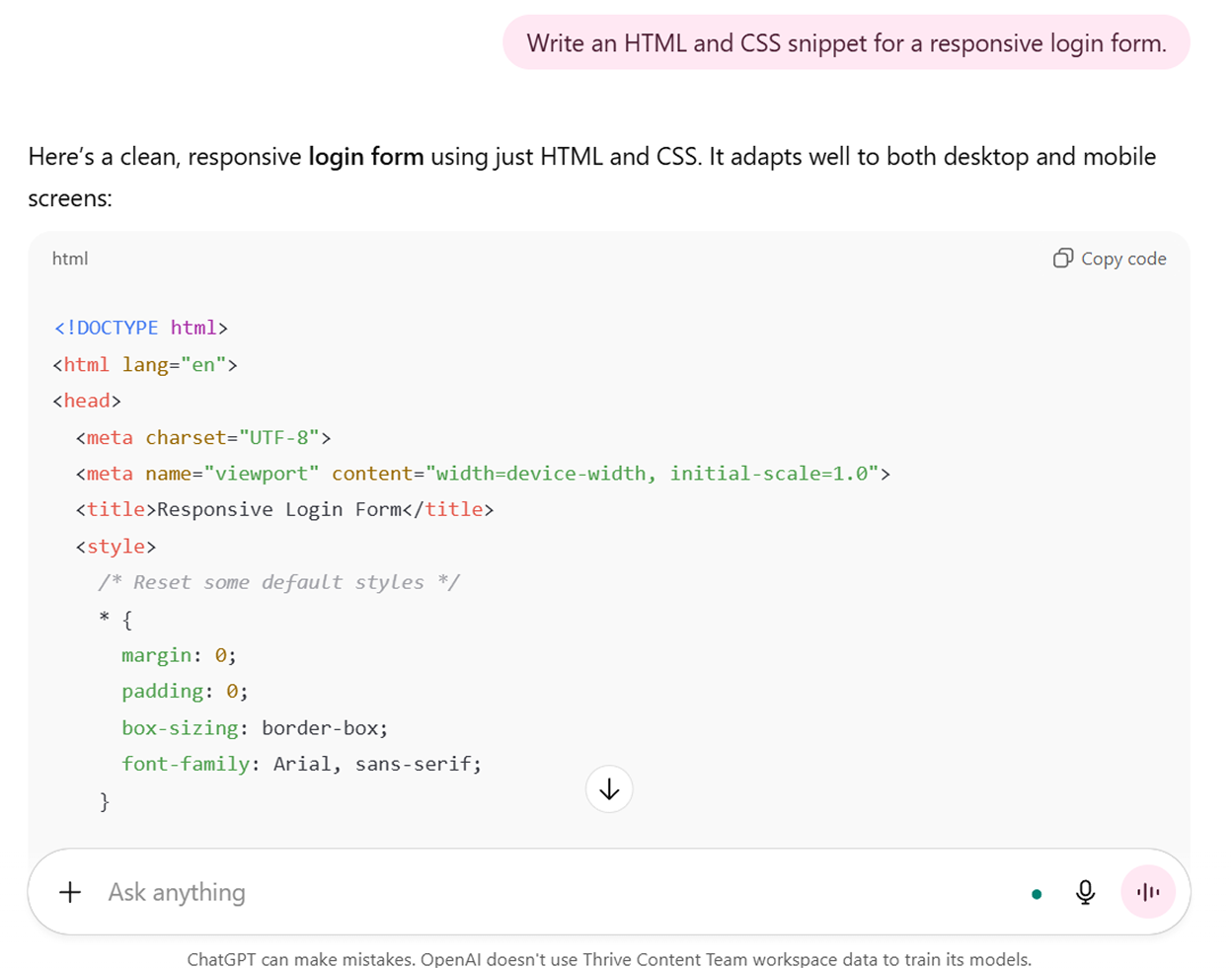
ChatGPT is also a capable coding assistant. It can generate code in multiple programming languages, explain snippets and even help debug errors, making it useful for both beginner programmers and experienced developers.
Here’s an example:
12. Image Generation
Users can generate graphics, logos, diagrams or concept art simply by describing their vision in natural language. This makes ChatGPT an invaluable tool for marketers, educators and entrepreneurs who need fast, on-demand visuals.
Let’s try asking ChatGPT to “Generate a minimalist logo featuring a mountain and sunrise, using calming earth tones.”
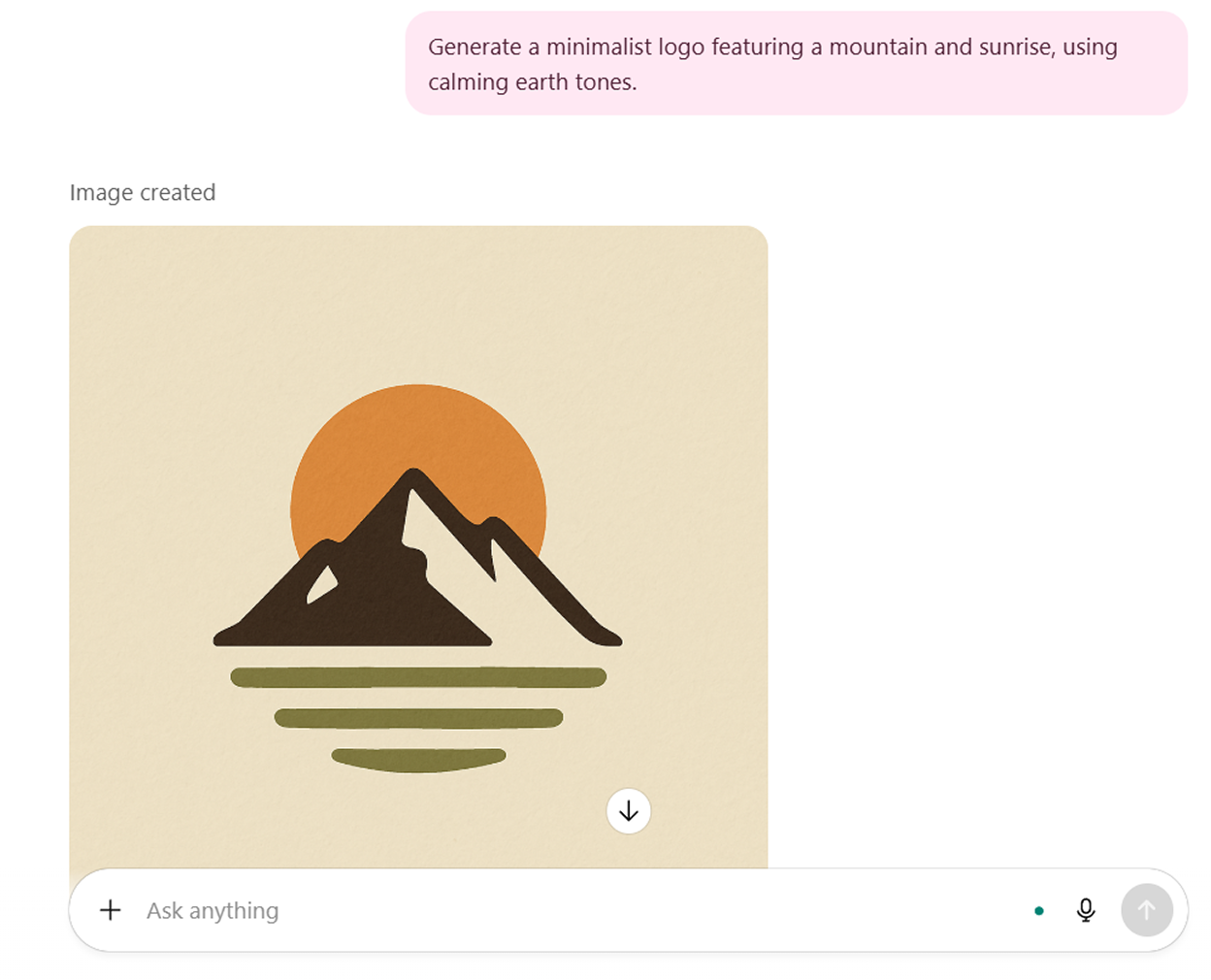
These AI-generated visuals can then be refined further or used directly as inspiration for a final design. This process saves time and allows users to move from concept to visual execution almost instantly.
What once required hours of design work or the help of a professional can now be achieved instantly.
This accessibility is one reason ChatGPT has exploded in popularity on platforms like TikTok. Many people now use the image generation tool to produce everything from aesthetic illustrations and custom avatars to storytelling visuals and brand mockups.
@theaiimpact Chat GPTs image generation is insane. I asked ChatGPT to turn me into an action figure… and that was just the beginning. Here are 5 wild ways you can use its new image generation tool — from virtual outfit try-ons to swapping yourself into a MrBeast thumbnail… and even building a full marketing campaign with visual #chatgpt #chatgpt4 #chatgptimages #chatgptimage #imagegeneration #ai #aitools ♬ original sound – The AI Impact | No BS Tips
Short-form videos showcasing “AI art prompts” and “before-and-after” transformations have gone viral, drawing millions of views and highlighting how quickly this technology is being embraced by mainstream audiences.
13. Language Translation
Unlike traditional dictionary-style translation, ChatGPT leverages context-aware natural language processing to deliver accurate, conversational translations. This makes it effective for both everyday communication and professional use cases. The model can detect tones, idiomatic expressions and cultural nuances, making the translation feel more natural.
Consider this example:
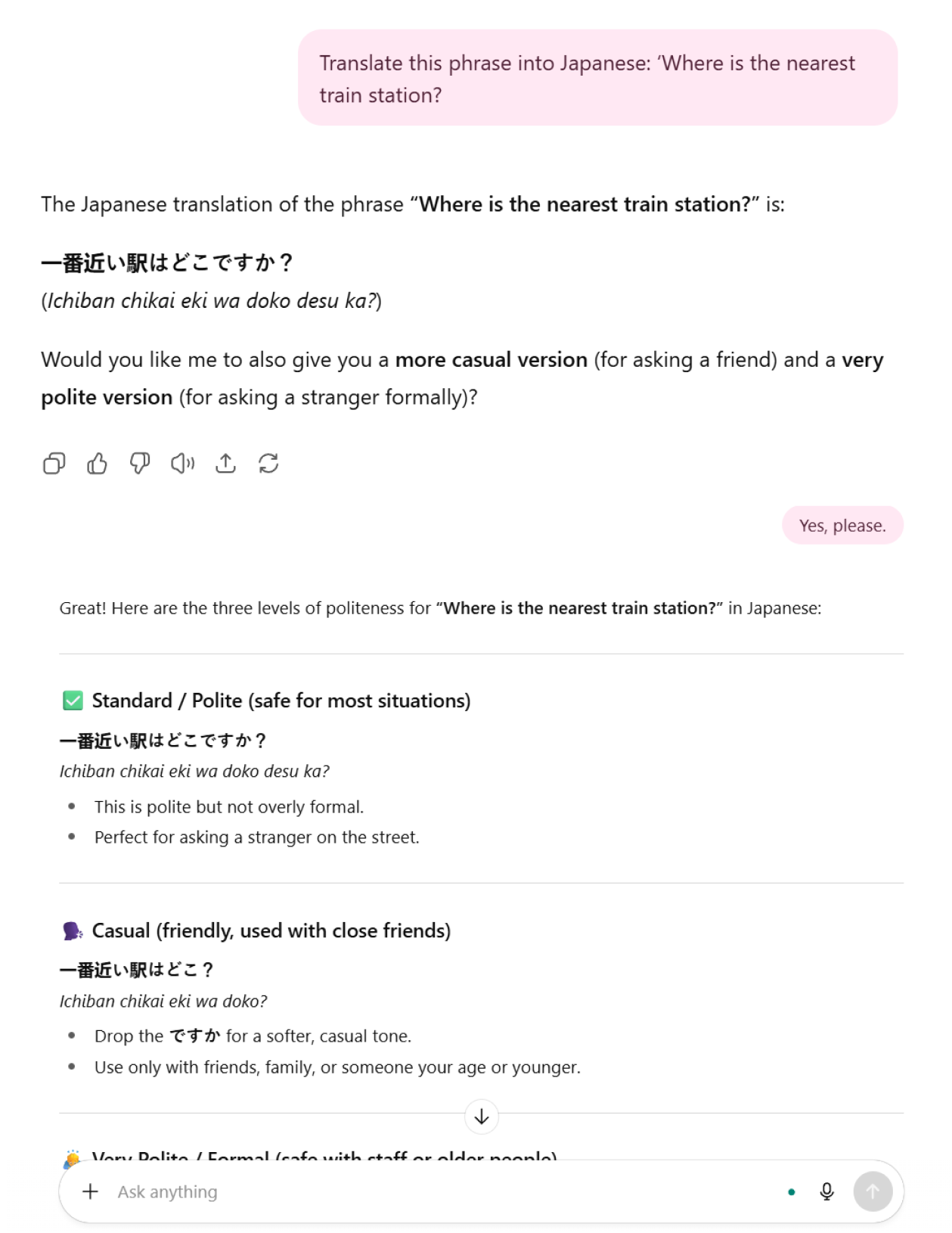
As seen above, ChatGPT not only offered direct translation but also provided options based on the level of politeness.
Similarly, businesses expanding internationally can use ChatGPT Search to localize product descriptions or marketing materials for different regions across the globe.
Limitations and Considerations
While ChatGPT is a powerful and versatile search tool, it is important to recognize its limitations and use it responsibly.
Where ChatGPT Search Works Well and Where It Doesn’t
1. Data Currency
ChatGPT as a search engine operates with a knowledge cutoff date. This means:
- It has access to information only up to that cutoff date.
- It does not automatically know events, facts or updates that happened after that date unless it can retrieve them through browsing tools (like web search) or connected data sources.
- Each model version has its own cutoff date. For example, some earlier versions were trained up to 2021, while newer ones extend later.
Users seeking the most up-to-date information should supplement ChatGPT’s responses with current sources or use it as a starting point for further research rather than a definitive, current source.
2. Accuracy and Factual Reliability
ChatGPT’s response generation process, while sophisticated, can sometimes produce inaccurate, incomplete or misleading information. This occurs because the model generates text based on statistical patterns learned from training data rather than accessing verified databases or fact-checking mechanisms.
Common accuracy issues include:
- Factual errors: Incorrect dates, statistics, historical facts or scientific information.
- Outdated information: Details that were accurate during training but have since changed.
- Conflation of concepts: Mixing elements from different but related topics.
- Overconfident responses: Presenting uncertain information with apparent certainty.
- Lack of source attribution: Inability to cite specific sources for claims.
Critical information, especially for professional, academic, medical or legal purposes, should always be verified through authoritative, peer-reviewed or official sources.
3. Bias and Perspective Limitations
Large language models like ChatGPT inevitably reflect biases present in their training data, which encompasses vast amounts of human-generated content from the internet, books and other sources.
These biases can manifest in various ways:
- Cultural bias: Overrepresentation of certain cultural perspectives.
- Historical bias: Reproduction of outdated social attitudes or stereotypes present in training materials.
- Language bias: Better performance in English and major languages compared to less-represented languages.
- Demographic bias: Potential underrepresentation of certain groups’ perspectives or experiences.
- Source bias: Overemphasis on readily available digital content, which may not represent all voices equally.
Users should be aware that ChatGPT’s responses may not reflect the full spectrum of human perspectives and should seek diverse viewpoints when discussing controversial, cultural or subjective topics.
4. Context and Nuance Limitations
While ChatGPT demonstrates impressive contextual understanding, it can struggle with:
- Complex situational context: Misunderstanding subtle implications or unspoken assumptions.
- Cultural nuances: Missing culture-specific references, humor or communication styles.
- Emotional intelligence: Limited ability to fully grasp emotional subtleties or interpersonal dynamics.
- Domain-specific expertise: Potential gaps in highly specialized professional knowledge.
- Ambiguity resolution: Difficulty handling deliberately ambiguous or metaphorical language.
5. Generative Nature and Hallucination
ChatGPT generates responses by predicting what text should come next based on patterns in its training data. This generative approach can lead to “hallucination” or the creation of plausible-sounding but entirely fabricated information, including:
- Non-existent citations or references
- Fictional events presented as historical facts
- Made-up statistics or data points
- Invented quotes or attributions
- Fabricated technical details or specifications
This tendency makes it critical to verify any specific claims, especially those that seem too convenient or perfectly suited to your query.
By maintaining awareness of these limitations while appreciating ChatGPT’s strengths in creative thinking and initial research, users can harness its capabilities more effectively while avoiding potential pitfalls associated with over-reliance on any single information source.
The emergence of ChatGPT and similar AI-powered search assistants has introduced what we can call “conversational search,” a paradigm where users engage in natural dialogue rather than typing fragmented keywords.
This approach transforms information retrieval from a hunting expedition through multiple websites into a guided conversation with an intelligent search assistant.
A Semrush study projected that traffic from AI search engines will overtake traffic from organic search in 2028.
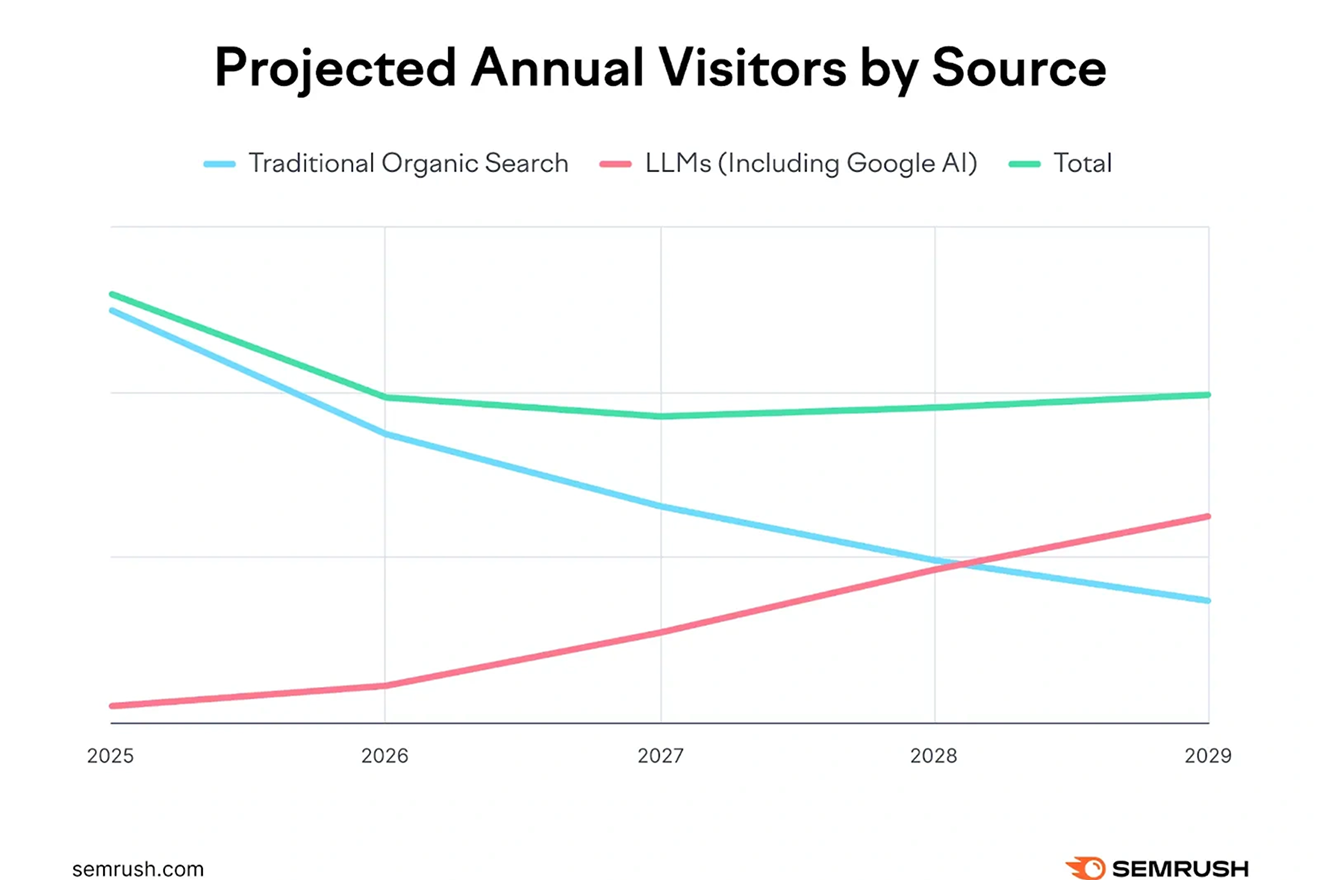
Image Source: Semrush
NOTABLE CHATGPT STATS
With this shift underway, it’s useful to look at the numbers that highlight ChatGPT’s growth and adoption across users and industries.
- ChatGPT.com gets approximately 5.24B visits per month (Semrush).
- ChatGPT ranks #5 in the world’s most visited websites (Exploding Topics).
- ChatGPT is the most popular AI tool for personal and workplace usage (Exploding Topics).
- About 83% of those who use AI assistants at home rely on ChatGPT (Exploding Topics).
- Users spend an average of 12 minutes and 9 seconds on the site (Semrush).
- ChatGPT.com has a bounce rate of 40.01% (Semrush).
- There are 64.27M ChatGPT app downloads so far (Demandsage).
- About 10M users globally use ChatGPT Plus (Demandsage).
ChatGPT Search vs. Traditional Search Engines
Evidently, many people are starting to rely on ChatGPT Search for information. Let’s explore how ChatGPT Search differs from traditional search engines.
| FEATURE | TRADITIONAL SEARCH ENGINES | CHATGPT SEARCH |
|---|---|---|
| Search Process | Reactive, keyword-driven | Conversational, context-aware |
| Results Format | List of links, snippets, ads | Direct answers with optional source browsing |
| User Experience (UX) | Fast but often noisy and ad-heavy | Clear, distraction-free, interactive |
| Accuracy | High, backed by indexed pages | Good but prone to hallucinations |
| Data Source | Indexed web pages | Pretrained models + live browsing (if enabled) |
| Best for | Quick factual queries, broad exploration | Conversational answers and complex, multi-layered research tasks |
| Optimization Strategy | Keyword focus | SEO + answer engine optimization (AEO) |
ChatGPT Search vs. Google’s AI
As ChatGPT drives the rise of conversational search, Google is racing to refine its own AI-powered search.
| FEATURE | CHATGPT SEARCH | GOOGLE AI SEARCH (Gemini, AI Overviews, AI Mode) |
|---|---|---|
| Data Source | Bing Search API + OpenAI index + real-time web | Google index + Gemini models |
| User Experience (UX) | Conversational | Integrated into Google search engine results pages (SERPs) |
| Citations | Often cites sources with clickable links for deeper exploration | Not always included |
| Personalization | Context-based | Deeply tied to users’ Google account, history and location |
| Strengths | Great for comparisons, brainstorming and direct Q&A | Recommended for broad discovery, local and commerce search |
| Best for | When you want a direct answer or synthesis | When you need comprehensive exploration or shopping options |
What does this mean for your business? ChatGPT Search and Google’s AI are unlikely to replace one another but serve different purposes.
Google AI Search is stronger for broad discovery and eCommerce, while ChatGPT excels at direct answers and synthesis. What they share is a reliance on trustworthy, well-structured content. This makes generative engine optimization (GEO) or otherwise known as AI SEO increasingly important for businesses aiming to stay visible.


Through extensive testing, ChatGPT SEO experts have identified several factors that influence how the Bing AI Search tool selects and prioritizes web sources when responding to user queries.
ChatGPT’s Criteria for Selecting Sources
1. Multiple, Precise Keywords
ChatGPT doesn’t only consider a single keyword match. It considers the entire query, breaking it down into multiple keywords and phrases. This helps the system retrieve content that is contextually aligned with the user’s question.
For example, if you ask, “What is the best budget-friendly project management software for remote teams?”, ChatGPT won’t simply pull results for “project management software.” Instead, it looks for sources that mention affordability and remote collaboration, among other relevant terms.
What does this mean for Bing/ChatGPT SEO?
To boost your SEO on Bing and ChatGPT Search, you must maximize your visibility across entire topic clusters rather than ranking for a single keyword. Your content should naturally weave in related phrases, synonyms and use-case-specific language to match how people actually ask questions.
Considering the example above, you must create in-depth, well-structured content that addresses pricing, features, comparisons and user scenarios. The more semantically rich and comprehensive your coverage, the more likely you are to ace how to rank in ChatGPT.
2. Search Intent
ChatGPT infers user intent and may internally consider intent-specific phrasing (such as “tutorial,” “guide” or “examples”) to produce a more helpful response.
For instance, if the user asks for definitions, it will lean toward encyclopedic or knowledge-based sources. If the query is about comparisons, ChatGPT will favor roundups, reviews and side-by-side evaluations.
What does this mean for ChatGPT SEO optimization?
To optimize websites for ChatGPT results, you must create content around different user intents. Publish educational content for informational searches, comparison guides and case studies for decision-making queries and reviews or testimonials for persuasive searches.
By aligning your content with real-world user intent, you increase your chances of being one of the sources ChatGPT pulls into its answer.
3. Recency
ChatGPT applies aggressive recency filters, often limiting results to content published within the last week or month for trending topics. For time-sensitive content, this creates an extremely competitive environment where material needs to be genuinely fresh – sometimes published within the same day – to pass the LLM’s recency requirements.
If you ask, “What are the latest features of the iPhone 16?”, ChatGPT will prioritize articles from sources published in the past few weeks, rather than citing a six-month-old iPhone review.
What does this mean for SEO for ChatGPT?
Keeping your content regularly updated is critical. Refresh your blogs and website content with the latest data and statistics. Add updated timestamps, optimize for trending queries and use structured data to signal freshness to Bing.
The more current your content appears, the greater the likelihood ChatGPT will treat it as a reliable, up-to-date source.
4. Credibility
ChatGPT mirrors Google’s Experience, Expertise, Authoritativeness and Trustworthiness (E-E-A-T) framework, preferring authoritative sources with established online presence and stellar reputation.
Well-known and reputable brands receive preferential treatment, with official government and international organization websites taking precedence for public health, legal or statistical information over commercial content.
Additionally, ChatGPT favors objective content over sensational writing and values clear explanations of methodologies.
What does this mean for ChatGPT SEO optimization?
To earn credibility and optimize website for ChatGPT results, focus on the E-E-A-T principles:
- Showcase author credentials
- Cite your own sources
- Pursue backlinks from reputable sites
Building topical authority in your niche through consistent, expert-level content increases your chances of ranking in ChatGPT.
5. Diversity of Perspectives
ChatGPT claims to seek diverse perspectives through its multiple search strategy, although testing reveals it often gravitates toward roundup sites and aggregation content rather than sources with distinct viewpoints.
For instance, if you ask, “What’s the best laptop for college students? ”, ChatGPT might pull insights from articles written by professional tech reviewers alongside community discussions from Reddit.
This creates opportunities for marketers who provide unique angles or underrepresented perspectives on popular topics rather than rehashing common viewpoints.
What does this mean for SEO on Bing and ChatGPT?
Your ChatGPT SEO optimization strategy should aim for visibility across different content formats and platforms. Beyond publishing authoritative content on your site, look for opportunities to get your brand or products mentioned in third-party roundups, forums, YouTube reviews and Q&A platforms.
The more diverse the mentions of your brand across the web, the more likely ChatGPT is to include you in a balanced, multi-perspective answer.

ChatGPT search results work differently from traditional search engines like Google or Bing. Instead of ranking pages primarily on backlinks, domain authority (DA) and keyword density, ChatGPT surfaces results based on contextual relevance, semantic understanding and conversational intent.
This means your SEO for ChatGPT should focus more on creating well-structured and context-rich content that aligns with natural language queries.
HOW TO RANK IN CHATGPT
1. Build Topical Authority
ChatGPT prioritizes content from sources that demonstrate depth and expertise on a subject, rather than one-off articles focusing on one keyword and a few keywords.
Some tips to boost your Bing and ChatGPT SEO performance:
- Create content clusters around a central theme.
- Cover related subtopics in detail. For instance, if your pillar page is about “Email Marketing Strategy,” create sub-articles on segmentation, automation, deliverability and analytics.
- Interlink your articles to signal a connected body of knowledge.
- Add frequently asked questions (FAQs), case studies and examples within the same page.
- Reference statistics and authoritative studies to strengthen depth.
2. Structure Content for Human and AI Comprehension
ChatGPT favors content that is easy to parse and structured logically. Your content structure should make it easy for ChatGPT to extract and synthesize key points.
Effective structuring techniques:
- Use descriptive headers to organize information.
- Add bullet points, numbered steps, diagrams and tables where applicable.
- Provide a concise summary or takeaway box at the top of each article.
- Start sections with direct, concise answers before diving into details.
3. Write in Conversational Language
ChatGPT is trained on conversational data, so it naturally favors content that sounds like it could fit into a dialogue. Writing in a clear, straightforward and conversational tone increases your chances of being surfaced in AI responses.
Some tips to optimize website for ChatGPT results:
- Use natural phrasing and simple, direct sentences instead of jargon-heavy phrasing.
- Anticipate the exact questions users might ask and answer them clearly.
- Include examples and analogies to clarify complex ideas.
4. Leverage Structured Data and Schema Markup
Structured data is a layer of code that helps search engines and LLMs understand the context and relationships within your content. While traditional SEO benefits from schema by earning rich snippets, ChatGPT relies on it to interpret what your page is really about and whether it’s trustworthy enough to cite.
To improve your Bing and ChatGPT SEO performance, you must:
- Use the FAQ schema to highlight Q&A sections.
- Include author information and publication dates.
- Specify article type and topic.
- Include relevant keywords.
5. Build Interactive and Engaging Content Elements
User engagement on your site still plays a major role in whether your content gets noticed and cited. AI-powered search assistants, such as ChatGPT, analyze signals such as time on page and interaction depth to determine which sources are worth surfacing.
If users consistently engage with your content rather than leaving immediately, it tells both traditional algorithms and AI-powered crawlers that your page delivers value.
Ways to improve engagement:
- Add calculators, quizzes or interactive tools.
- Embed relevant videos and infographics.
- Use internal linking to encourage deeper site exploration.
- Encourage user reviews and comments.
6. Optimize for Brand Mentions (Not Just Clicks)
One of the biggest shifts from traditional SEO to AI-driven search is that ChatGPT doesn’t always provide clickable links. Instead, it directly mentions brands by name within its responses.
This means brand presence and reputation signals matter more. If ChatGPT is trained to consistently associate your brand with authority on a given topic, it will include you in its generated answers even if it never points to your URL.
How to increase brand mentions and boost SEO on Bing and ChatGPT:
- Create citation-worthy statistics and research.
- Get featured in industry roundups, review sites and forums.
- Invest in digital PR content and thought leadership articles.
- Build credibility with E-E-A-T signals (author bios, expert credentials, reputable sources).
7. Keep Content Fresh
ChatGPT prioritizes recency as a trust factor. If your content is outdated, ChatGPT may either skip it entirely or pull more updated information from competitors, even if your content has stronger SEO fundamentals.
In other words, content decay happens faster in AI search because user expectations for up-to-date answers are higher.
Some ChatGPT search optimization hacks:
- Update blogs regularly with new stats and examples.
- Add “Last updated” notes for transparency.
- Republish cornerstone content with current year titles (e.g., “Best SEO Tools in 2025”).
8. Strengthen Local Presence
ChatGPT doesn’t rely solely on your website. Instead, it pulls heavily from online reviews, business directories and local citations. This means even if your site is well-optimized, you may lose ChatGPT visibility if your local signals (like reviews and business listings) are weak or inconsistent.
Useful tips to strengthen SEO for ChatGPT Search:
- Ensure your Google Business Profile (photos, hours, categories) is optimized and up-to-date.
- Collect and manage customer reviews.
- Maintain NAP consistency (Name, Address, Phone) across platforms.
- Implement LocalBusiness schema on your site.
- Publish geo-targeted blog posts and landing pages.
9. Prioritize Technical and UX Optimization
While ChatGPT doesn’t directly rank based on page speed or mobile optimization, these technical factors affect content accessibility and user engagement signals that influence AI training data.
Critical technical optimizations include:
- Page speed optimization
- Mobile-first content structure
- Semantic HTML structure
- Accessibility optimization
10. Monitor ChatGPT Search Performance
Optimizing for ChatGPT Search is only half the battle. The other half is measuring whether your ChatGPT Search optimization efforts are actually working. However, the challenge is that ChatGPT often provides zero-click answers or mentions your brand without linking to your site.
Here’s how to measure your ChatGPT Search performance:
- Track brand mentions in AI-generated responses. You can use advanced tactics or regularly test prompts your target audience might use (e.g., best CRM for small businesses) and see if your brand appears.
- Measure citation volume and quality.
- Track referral traffic from LLMs in Google Analytics.
How To Use ChatGPT for SEO
Here’s a bonus: You can leverage ChatGPT to improve your AI visibility!
ChatGPT can also function as your SEO assistant, helping you uncover opportunities and improve your search performance.
1. Strategic Content Ideation
One of ChatGPT’s strongest SEO applications is generating content ideas that align with your audience’s search behavior. Rather than struggling with writer’s block or recycling the same topics, you can use the LLM to uncover fresh angles and comprehensive topic clusters.
Here’s a sample prompt to get you started:

Keep in mind that the quality of your ChatGPT output depends entirely on the quality of your input. Vague prompts produce generic results, while detailed, context-rich prompts generate valuable insights.
2. Keyword Research and Integration Strategies
While ChatGPT shouldn’t be your primary keyword research tool, it can enhance your keyword strategy in several valuable ways, including:
- Semantic keyword expansion
- Natural keyword integration
- Long-tail keyword discovery
3. Content Outline Development
As discussed earlier, ChatGPT and search engines favor content that’s logically organized and easy to navigate. ChatGPT can help you develop comprehensive outlines that satisfy both users and algorithms.
How ChatGPT can help with:
- SEO-driven outlines: ChatGPT can take a target keyword and suggest heading structures that align with on-page SEO best practices.
- Competitor-informed outlines: By providing summaries of top-ranking articles, you can ask ChatGPT to create an improved outline that covers information gaps and offers a stronger flow.
- Reader-first approach: ChatGPT ensures outlines are logical, scannable and engaging, which improves dwell time and readability.
4. Meta Descriptions and Title Tag Optimization
Meta descriptions and title tags directly influence click-through rates (CTR) from search results. They must be concise, keyword-rich and compelling. ChatGPT can help you create multiple variations to test and optimize.
How to use ChatGPT for SEO:
- Title variations: ChatGPT can generate multiple SEO-friendly title tag options, balancing keyword placement with emotional triggers.
- Meta description drafts: By inputting the article’s summary, you can generate polished 150–160-character meta descriptions that encourage clicks.
- CTR optimization: You can request snippets that use urgency or value-driven language.
5. Content Enhancement
Finally, you can leverage ChatGPT to optimize existing content so it performs better for both search engines and readers. Once you have a draft or even a published article, ChatGPT can act as a content editor and SEO optimizer in one.
ChatGPT as an SEO tool can help with:
- Content gap analysis
- Improving readability and flow
- Strengthening SEO alignment
- Adding engaging elements
- Optimizing for SERP features
- Content expansion
ChatGPT Best Practices and Common Pitfalls To Avoid
DOs:
- Always fact-check ChatGPT’s output before publishing.
- Use AI-generated content as a starting point, not a final product.
- Incorporate your unique expertise and perspective.
- Validate keyword suggestions with actual SEO tools.
- Test different prompts to get varied outputs.
- Maintain your brand voice and tone throughout.
DON’Ts:
- Never publish ChatGPT content without human review and editing.
- Don’t rely on ChatGPT for current events or real-time data.
- Avoid using AI content without adding personal insights.
- Don’t skip keyword research validation.
- Never ignore E-E-A-T requirements.
- Don’t sacrifice content quality for production efficiency.
Your Next Leads Are Already in ChatGPT
ChatGPT marks a major shift in how people discover information, offering a streamlined experience that feels more like talking to an assistant than digging through a database.
At Thrive Internet Marketing Agency, we’ve seen firsthand how powerful ChatGPT Search can be. From January to October of 2025, we grew our traffic from ChatGPT Search by +862%, and that visibility turned directly into leads and conversions.
This isn’t a trend to watch, it’s a channel to act on now. With millions of people turning to AI assistants for answers every day, your business needs to be visible where the conversations are happening.
Let’s build your ChatGPT Search optimization strategy today. Contact us now.
Frequently Asked Questions About ChatGPT SEO
IS CHATGPT FREE TO USE?
Yes. ChatGPT Search is available to everyone, including users without an OpenAI account. You can access it through the web interface at chat.openai.com or download the mobile app. While basic search functionality is free, ChatGPT Plus subscribers get enhanced features and priority access during peak usage times.
HOW DOES CHATGPT SEARCH IMPACT SEO?
ChatGPT Search is reshaping SEO into what’s now called Answer Engine Optimization (AEO). Instead of focusing mainly on keywords and backlinks, success depends on creating content that AI models can easily understand, summarize and cite.
HOW ACCURATE IS CHATGPT SEARCH COMPARED TO TRADITIONAL SEARCH ENGINES?
While ChatGPT Search provides convenient, synthesized answers, it can sometimes produce inaccurate or outdated information due to its generative nature. The system may “hallucinate” or create plausible-sounding but fabricated details. Traditional search engines typically have higher accuracy for factual queries since they direct you to original sources. Always verify critical information through authoritative sources, especially for medical, legal or financial decisions.
CAN CHATGPT ACCESS REAL-TIME INFORMATION?
Yes. ChatGPT Search can retrieve real-time information through its web browsing capabilities. It can access current news, stock prices, weather forecasts, sports scores and other live data feeds. However, the data currency depends on how recently the source was updated and indexed by search engines like Bing.
HOW CAN BUSINESSES OPTIMIZE THEIR CONTENT FOR CHATGPT SEARCH?
Businesses should focus on building topical authority through comprehensive content clusters, structuring content with clear headers and logical organization, writing in conversational language that matches natural queries, implementing structured data markup and maintaining fresh, updated content.
DOES CHATGPT SEO REPLACE TRADITIONAL SEO STRATEGIES?
No. ChatGPT SEO doesn’t replace traditional SEO but requires an expanded approach. While traditional ranking factors like backlinks and domain authority still matter, businesses now need to optimize for Answer Engine Optimization (AEO) alongside SEO. This includes focusing on conversational queries, building brand authority and creating content that AI can easily parse and synthesize.
WHAT IS THE FUTURE OF CHATGPT SEARCH AND AI-POWERED SEARCH ENGINES?
Industry projections suggest that traffic from AI search engines may overtake traditional organic search by 2028. As more users adopt conversational search patterns, businesses will need to adapt their digital marketing strategies to maintain visibility. The trend points toward answer engines becoming primary information sources, requiring optimization strategies that go beyond traditional SEO practices.
WHAT TYPES OF SEARCHES WORK BEST WITH CHATGPT?
ChatGPT Search excels at complex, multi-part questions, comparison queries, research tasks and requests requiring synthesis from multiple sources.
HOW CAN I TELL IF CHATGPT INFORMATION IS RELIABLE?
Always verify important information through the provided source links and cross-reference with multiple authoritative sources. Be especially cautious with medical, legal, financial or safety-related information and consult professionals for critical decisions.